

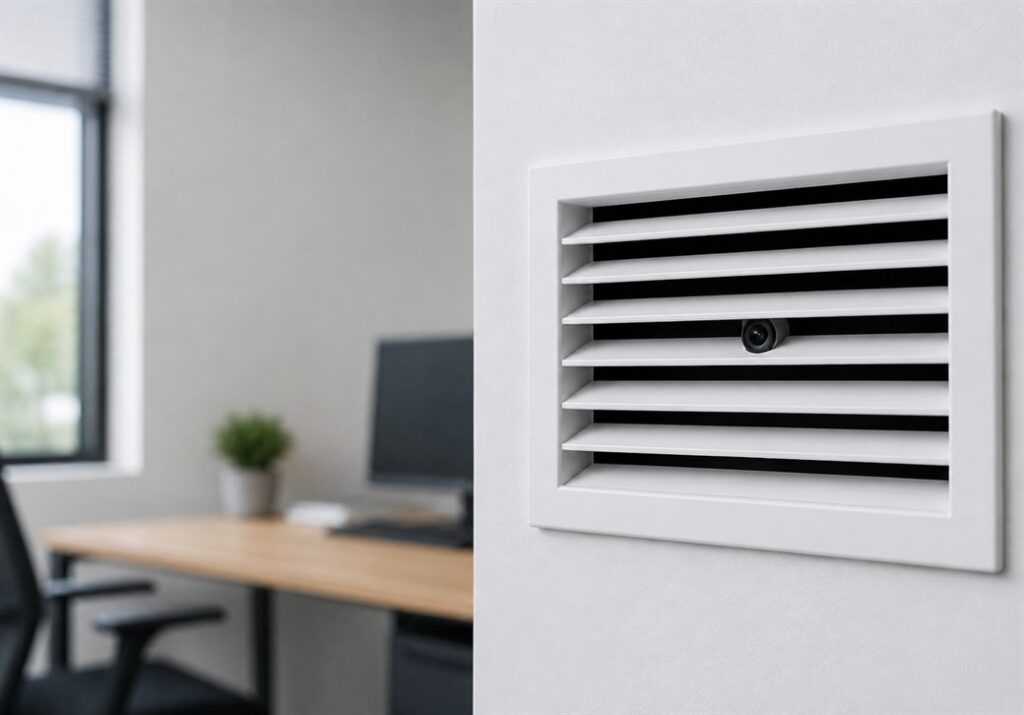
A pin hole camera is the smallest practical surveillance camera you can buy. The lens is a few millimetres across, which means it fits places a normal camera simply cannot go, and it stays unnoticed in rooms where a visible camera would change how people behave.
That size is the whole point, and it is also the trade-off. A pin hole camera gives up some of what a bigger camera takes for granted, and knowing exactly what it gives up is the difference between a purchase that solves your problem and one that sits in a drawer.
This guide covers what a pin hole camera can and cannot do, the specifications that actually matter when comparing models, where to place one, and where South African law draws the line.
Table of Contents
What Is a Pin Hole Camera?
A pin hole camera is a surveillance camera built around a lens small enough to see through an opening the width of a pin. The name describes the aperture, not the camera body. The electronics behind it, the sensor, the battery and the Wi-Fi module, still take up space, but the only part that has to be exposed is a hole a few millimetres across.
That is what separates it from every other kind of hidden camera. A clock camera, a speaker camera or a charging station camera hides a camera inside an object that has a reason to be in the room. A pin hole camera does not need a host object at all. It can sit behind a vent, above a ceiling tile, inside existing cabinetry, or in the gap beside a shelf bracket.
The result is a camera that is not disguised so much as simply not visible. There is nothing to recognise and nothing to pick up and examine.
Why Choose a Pin Hole Camera Over a Larger Hidden Camera?
Object-based hidden cameras work well when the object belongs where you put it. A desk clock on a desk raises no questions. The problem comes when the room gives you nothing to work with, or when the same object appearing for the first time is itself the thing that gets noticed.
A pin hole camera solves three situations that a larger unit struggles with.
- Rooms where nothing new can appear. A storeroom, a till point or a workshop where the contents are known and a new object stands out immediately.
- Positions no object could occupy. High corners, ceiling voids, inside existing fittings, or anywhere the camera needs a downward angle that no desk object could give it.
- Situations where the camera may be searched for. Someone sweeping a room will pick up and turn over the clock, the speaker and the plug adaptor. A lens behind a vent grille survives that search.
If none of those apply to your situation, a larger unit is often the easier buy. An object-based camera is quicker to place, simpler to retrieve and easier to reposition. Read the hidden clock camera guide if that sounds closer to what you need.
How a Pin Hole Camera Works
The Lens and What It Can See
Light enters through the small front aperture and falls on a sensor behind it. Because the opening is small, less light reaches the sensor than in a camera with a large lens. That single fact drives most of the practical behaviour of a pin hole camera: it performs very well in a well-lit room and it degrades faster than a larger camera as the light drops.
Field of view is narrower than a wide-angle security camera. Plan for a defined area, a doorway, a till, a desk, a safe, rather than a whole open-plan floor. Aiming matters more here than with any other camera type, because you have less margin to crop into later.
Recording and Streaming
There are two independent things a modern pin hole camera can do, and it is worth being clear that they are separate.
- Record locally to a microSD card. No network, no account, no internet. The footage lives on the card and you retrieve it by taking the card out.
- Stream over Wi-Fi to an app. The camera joins your network and you watch live or review saved footage from a phone, tablet or computer, from anywhere.
A camera that does both gives you a choice per installation. Where there is no usable Wi-Fi, or where you specifically do not want the camera touching a network, run it on the card alone. Where you need to know what is happening while it happens, connect it.
What to Check Before You Buy
Resolution and Frame Rate
1080p is the sensible floor. At 1080p, a face two to four metres from the lens is identifiable in good light, which is the standard most people actually need footage to meet. Below 1080p you can see that something happened without being able to say who did it, which is usually worthless.
Frame rate is quoted less often and matters more than people expect. 30 frames per second holds together when something moves quickly across the frame. Lower rates produce the stuttering footage where the one moment you needed falls between two frames.
Battery Life
This is where pin hole cameras differ most from each other, and it is the specification worth paying for. Many small cameras run 2 to 3 hours of continuous recording, which sounds adequate until you realise it will not cover a working day, let alone a night.
Battery life also determines how often you have to go back to the camera, and every retrieval is a moment where a hidden camera stops being hidden. A unit you service once a week is in a different category to one you service twice a day.
Night Vision
Check this specifically, and do not assume it is included. Many pin hole cameras have no night vision at all, and there is a physical reason for it: infrared night vision needs IR emitters around the lens, and those emitters need space and give off a faint red glow that defeats the purpose of a camera whose whole value is being invisible.
So there is a genuine trade-off rather than a missing feature. If you need footage in an unlit room, a pin hole camera is the wrong tool and you want a larger unit with proper IR. If your target area has light whenever anything happens in it, which covers most retail, office and daytime domestic use, the absence costs you nothing.
Wi-Fi Band
Small cameras generally use 2.4GHz rather than 5GHz, which is the right choice for this application because 2.4GHz travels further and penetrates walls better. It matters at setup time, though. Many modern routers broadcast both bands under one network name, and a phone sitting on 5GHz can fail to pair a 2.4GHz camera.
If pairing fails, that is almost always the cause rather than a faulty camera. Split the bands into separate network names temporarily, or connect your phone to the 2.4GHz network for the pairing step.
Storage
Check the maximum card size supported and buy toward the top of it. As a working guide at 1080p, a 32GB card holds roughly 6 to 8 hours, a 128GB card around 24 to 30 hours, and a 256GB card 50 hours or more.
Two settings change that arithmetic completely. Loop recording overwrites the oldest footage when the card fills, so the camera never simply stops. Motion-activated recording only writes when something moves, which on a quiet area can stretch a card across weeks rather than hours. Use both unless you have a specific reason not to.
Multi-Camera Support
If there is any chance you will add a second camera later, check how many the app handles before you buy the first one. Covering a room properly often needs two angles, and covering a small business usually needs three or four. Discovering the limit after you have bought four cameras is an expensive way to learn it.
Where a Pin Hole Camera Fits
The right position gives the lens a clear line to the area that matters, keeps the aperture in shadow, and leaves the body of the camera somewhere you can reach without an audience.
- Behind a vent or grille. The slots hide the aperture completely while leaving a clear view. One of the most reliable placements available.
- Inside existing cabinetry or shelving. A small hole drilled at the back of a shelf edge, aimed at a till or safe.
- High corners and ceiling voids. A downward angle covering a doorway and the area behind it, well above normal eye line.
- Storerooms and stock areas. Where shrinkage happens and where a new visible object would immediately change behaviour.
- Aimed at a specific fixed point. A safe, a cash drawer, a medicine cabinet, a server rack. Narrow field of view is an advantage when the target does not move.
Two things to avoid. Do not aim into a window or a bright light source, because the lens will expose for the bright area and everything else in frame becomes a silhouette. And do not choose a position you cannot service discreetly, because a camera you can only reach in front of people is a camera that gets discovered on the day you need to swap the card.
Lighting Matters More Here Than Anywhere Else
A small aperture gathers less light, so the gap between what a pin hole camera produces in a well-lit room and what it produces in a dim one is wider than for any other camera type. This is the single most common reason people are disappointed with footage from an otherwise good unit.
The fix is usually free. Work out when the events you care about actually happen, then check the light in that area at that hour rather than when you are installing. A storeroom that is fine at two in the afternoon may be useless at six in the evening, and a light left on is cheaper than a camera that cannot see.
If the area genuinely has to be dark, accept it and choose differently. A larger camera with real infrared will serve you better than the smallest camera with none.
Is It Legal to Use a Pin Hole Camera in South Africa?
Yes, within limits, and the limits are about where the camera points rather than how small it is. You may record in spaces you own or control, in areas where nobody has a reasonable expectation of privacy. Your own home, your business premises, your storeroom, your office.
Where a reasonable expectation of privacy exists, recording is not acceptable regardless of who owns the building. Bathrooms and changing rooms are the clear cases. Private living quarters, including a domestic worker’s own room, are another. Being concealed does not change the answer, and a covert camera in one of those places is a serious matter rather than a technicality.
Audio deserves separate thought. Recording a conversation you are not part of is treated differently from video under South African law, so if the camera captures sound, be deliberate about that rather than incidental.
For workplace monitoring, POPIA applies to how you handle the footage as much as to the recording itself. Have a reason you can state plainly, keep the footage only as long as that reason holds, and limit who can view it. If you are monitoring staff as a group rather than investigating a specific incident, take proper advice first.
This is general guidance and not legal advice. If the footage may end up in a disciplinary hearing or in court, confirm your position with an attorney before you rely on it.
The Spy World Covert Pin Hole Wi-Fi and IP Smart Camera
Measured against the checklist above, this is where the Covert Pin Hole Wi-Fi and IP Smart Camera lands.
- 1080p HD at up to 30 frames per second. Meets the identifiable-face standard in good light, at a frame rate that holds up on movement.
- Around 20 hours of continuous recording. The headline specification. Conventional cameras in this size class manage 2 to 3 hours, so this is closer to a week of business hours than a single shift.
- Motion detection with push notifications. The camera messages your phone when it detects movement, and you can open the app and watch live from there.
- Remote viewing over 2.4GHz Wi-Fi. Live footage and saved recordings on iPhone, iPad, Android phone or tablet, or a computer, from anywhere with a connection.
- Works with no Wi-Fi at all. Fit a microSD card from 8GB to 256GB and it records locally. The card is not included, so order one with it.
- Up to four cameras on one app. Four areas or four angles side by side, which covers most small premises without a second system.
- No night vision. Stated plainly because it decides whether this is the right camera for your situation. It needs light in the area it is watching.
In the box: the pin hole camera, the battery and a USB cable. Priced at R4,500 and in stock.
The short version of who it suits: a lit area, a defined target, a need for long unattended runtime, and a position where nothing new can be seen to appear. If your area is dark when it matters, look at a larger unit with infrared instead.
Setting It Up
Do the whole setup at a desk before the camera goes anywhere near its final position. Fifteen minutes of testing in your hand saves an hour of retrieving a camera that was recording a ceiling.
- Charge it fully first. A part-charged battery makes a working camera look faulty.
- Format the microSD card in the camera rather than in a computer, so the card matches the file system the camera expects.
- Pair the app on 2.4GHz. If pairing fails, put your phone on the 2.4GHz network and try again before assuming a fault.
- Set the date and time. Footage with a wrong timestamp is much weaker if it is ever needed to establish when something happened.
- Turn on loop recording and motion detection so the card manages itself and the alerts reach you.
- Record a test clip from the intended position and at the intended hour, then watch it on a full screen rather than a phone. Check the framing and check the light.
- Note when the battery will need charging and plan the retrieval before you install, not after.
If you are securing a room against surveillance rather than setting it up, that is the opposite job and it needs different equipment. Our debugging sweep services cover that.
Frequently Asked Questions
How small is a pin hole camera lens?
The aperture is usually only a few millimetres across, which is what lets it sit behind a vent slot or a small drilled hole. The camera body behind it is larger, because the sensor, battery and Wi-Fi module still need space. Only the opening has to be exposed.
Does a pin hole camera work without Wi-Fi?
Yes. Fit a microSD card and it records locally with no network and no internet at all. Wi-Fi is only needed for live remote viewing and motion alerts on your phone. The Spy World Covert Pin Hole camera supports cards from 8GB to 256GB, sold separately.
How long does the battery actually last?
The Spy World Covert Pin Hole camera runs roughly 20 hours of continuous recording, against the 2 to 3 hours typical of conventional cameras this size. On motion-activated recording rather than continuous, it stretches considerably further because it only writes when something moves.
Can a pin hole camera record in the dark?
Most cannot, including this model, which has no night vision function. Infrared needs emitters around the lens, and those take space and give off a faint red glow that would defeat the point of a camera this discreet. For an unlit area, choose a larger camera with proper infrared instead.
What size microSD card should I buy?
At 1080p, roughly 6 to 8 hours fits on 32GB, 24 to 30 hours on 128GB, and 50 hours or more on 256GB. With loop recording on, the camera overwrites the oldest footage instead of stopping, and with motion-activated recording a card can last weeks on a quiet area.
Can I watch more than one camera on my phone?
Yes, up to four cameras at once on the same app, so you can cover four areas or four angles side by side. Check this limit before buying multiple cameras, because covering a room properly often takes two angles and a small business usually takes three or four.
Where can I buy a pin hole camera in South Africa?
Spy World supplies covert pin hole cameras along with a full range of surveillance and counter-surveillance equipment, with shipping across South Africa.
Key Takeaways
- A pin hole camera hides the aperture rather than disguising the camera, so it fits positions no object-based camera can reach.
- 1080p at 30 frames per second is the sensible minimum for footage that can identify a face.
- Battery life is the specification that separates models. 20 hours against a typical 2 to 3 changes how often you have to expose the camera.
- Check night vision specifically. Many pin hole cameras have none, for a physical reason, and that decides whether one suits your area.
- Light matters more than with any other camera type. Check the light at the hour the events happen, not at the hour you install.
- The camera works with a microSD card and no network, or over 2.4GHz Wi-Fi for live viewing and alerts.
- South African law follows where the camera points. Spaces you control are fine, and anywhere with a reasonable expectation of privacy is not.
Some Products to view:
– Covert Pin Hole Wi-Fi & IP Smart Camera
– Covert Desk Top Clock Camera