

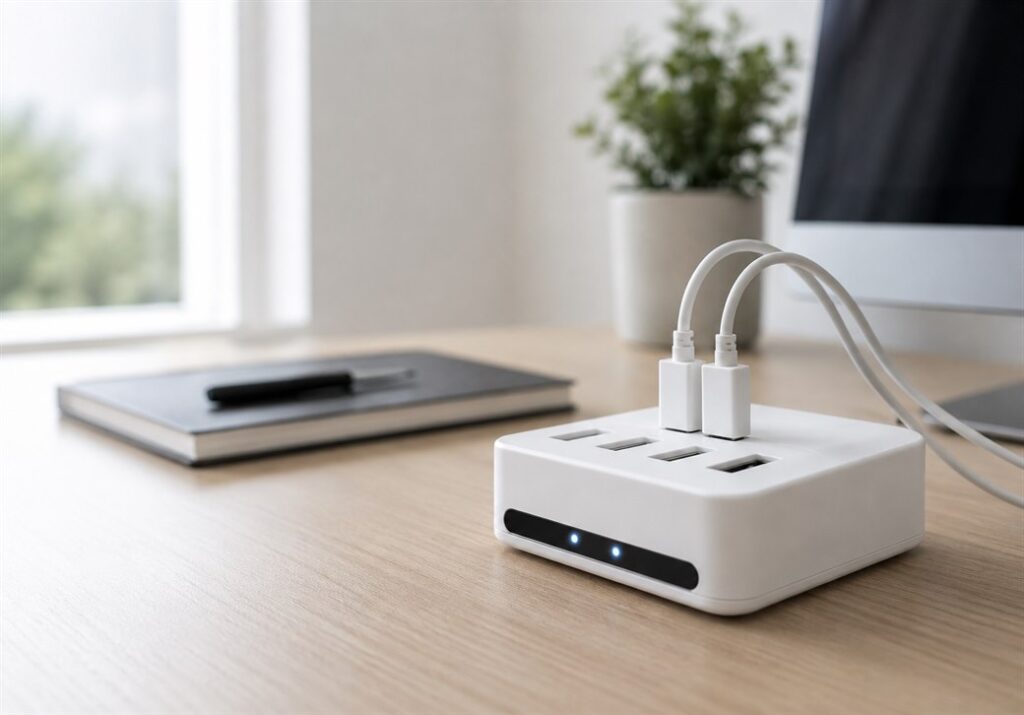
A USB charging station hidden camera solves the problem every other covert camera eventually runs into: power. It sits on a desk doing a job everyone understands, it charges phones and tablets exactly as a charging hub should, and because it draws from the wall it can record indefinitely without anyone ever going near it.
That is a different proposition to a battery unit. A battery camera gives you hours and then needs retrieving, and every retrieval is a moment where a hidden camera stops being hidden. A mains-powered one runs until you decide otherwise.
This guide covers how these cameras work, the specifications that separate a useful one from a frustrating one, where to place it, and where South African law draws the line.
Table of Contents
What Is a USB Charging Station Hidden Camera?
It is a working multi-port USB charging hub with a camera and a digital video recorder built into the housing. Plug it into a wall socket, plug your phone into it, and it charges exactly as any other charging station would. The camera sits behind the casing and records the room in front of it.
The concealment works because of what the object is, not because the object is hidden. A charging hub on a desk, a counter or a bedside table is invisible in the way ordinary things are invisible. Nobody questions why it is there, nobody wonders what it is for, and because it is plugged in, nobody thinks twice about the cable running to it.
That is the opposite approach to a pin hole camera, which hides the aperture and needs no host object at all. Both work. Which one suits you comes down to whether the room can accommodate a new object without anyone noticing, and whether you have a power outlet where you need the camera.
Why Mains Power Changes What a Hidden Camera Can Do
Battery life is the constraint that shapes every covert camera decision. A small battery unit gives you hours, a very good one gives you a day, and then somebody has to physically go to the camera, retrieve it, charge it and put it back. Each of those trips is a risk, and they have to happen on a schedule whether it suits you or not.
A USB charging station hidden camera removes that entirely. It records for as long as it is plugged in, which turns surveillance from a series of timed windows into something continuous. That matters most when you do not know when the thing you are looking for will happen, which is usually the situation people are actually in.
The trade-off is placement. The camera has to live within reach of a plug point and pointing the right way, and it cannot be tucked into a ceiling void or behind a vent. You are choosing endurance over freedom of position.
How It Works
Recording Modes
There are two useful modes and they suit different jobs.
- Continuous recording writes everything. Nothing is missed, but the card fills quickly and you have hours of footage to review.
- Motion-activated recording only writes when something moves in frame. On a quiet area it stretches the same card across a far longer period, and it means the footage you keep is the footage where something happened.
Motion activation is the sensible default for most situations. Use continuous when you need an unbroken record, for example where footage may be relied on later to show that nothing happened as much as that something did.
Remote Viewing
Connected to Wi-Fi, the camera streams to an app on a phone, tablet or computer, so you can watch live or review recordings from anywhere with a connection. Motion detection can push a notification the moment something triggers it, which turns the camera from a record you check later into something that tells you now.
The recording and the streaming are independent. If there is no usable Wi-Fi, or you would rather the camera never touched a network, it still records to the card perfectly well and you retrieve the footage by hand.
What to Check Before You Buy
Resolution and Frame Rate
1080p is the level at which a face two to four metres from the lens is identifiable in good light. Below that you can see that something happened without being able to say who did it, which is usually worthless. Frame rate matters too: 30 frames per second holds together when someone moves quickly across the frame, where lower rates drop the one moment you needed.
Card Capacity and Loop Recording
Check the maximum card size the unit supports, because this is where charging station cameras differ most from battery models. A ceiling of 32GB holds roughly 6 to 8 hours of 1080p footage, which sounds limiting until you pair it with the two settings that matter.
Loop recording, sometimes called the overwrite function, means the camera writes over the oldest footage when the card is full rather than simply stopping. Combined with motion-activated recording on a quiet area, a 32GB card can cover days rather than hours, because it only spends capacity on the moments that matter. Without loop recording, a full card is a camera that quietly stopped working.
Does the USB Charging Station Hidden Camera Actually Charge Anything?
This sounds obvious and it is the one people forget. The whole concealment depends on the object doing its apparent job. A charging station that does not charge, or charges so slowly that someone unplugs it in irritation, draws exactly the attention you were avoiding. Check the output rating and check that the ports work.
Lighting
Night vision is not standard on this type of camera, so unless it is specifically listed, assume the unit needs light in the room to produce usable footage. Work out when the events you care about actually happen and check the light in that area at that hour rather than when you are installing. A room that is fine at two in the afternoon may be useless at nine in the evening.
If the area genuinely has to be dark, this is the wrong tool and a larger camera with proper infrared will serve you better.
Where a Charging Station Camera Fits
A USB charging station hidden camera needs three things from its position: a clear view of the area that matters, a plug point within reach, and somewhere a charging hub genuinely belongs.
- Reception desks and counters. A charging hub is expected furniture, and the position naturally faces whoever approaches.
- Home offices and studies. Covers a desk, a safe or a filing cabinet, in a room that already has devices needing charge.
- Staff rooms and back offices. Where stock goes missing and where a visible camera would change behaviour rather than record it.
- Living areas and entrance halls. For domestic monitoring while you are away, with the app doing the watching.
- Holiday homes and rental properties. Mains power means it keeps working through an entire absence, in common areas only.
Two things to avoid. Do not aim it into a window or a bright lamp, because the lens exposes for the bright area and everything else becomes a silhouette. And do not put it somewhere a charging station has no business being, because an object that does not fit its surroundings gets picked up and examined.
Is It Legal to Use One in South Africa?
Yes, within limits, and the limits are about where the camera points rather than how well it is concealed. You may record in spaces you own or control, in areas where nobody has a reasonable expectation of privacy. Your own home, your business premises, your office, your reception area.
Where a reasonable expectation of privacy exists, recording is not acceptable regardless of who owns the building. Bathrooms and changing rooms are the clear cases. Private living quarters, including a domestic worker’s own room, are another. Being concealed does not change the answer.
For workplace monitoring, the Protection of Personal Information Act governs how you handle the footage as much as the recording itself. Have a reason you can state plainly, keep the footage only as long as that reason holds, and limit who can view it. If you are monitoring staff generally rather than investigating a specific incident, take proper advice first. The Information Regulator of South Africa is the authority that oversees this and publishes guidance worth reading before you install anything in a workplace.
This is general guidance and not legal advice. If the footage may end up in a disciplinary hearing or in court, confirm your position with an attorney before relying on it.
The Spy World Covert 4 USB Charging Station Booster Camera
Measured against the checklist above, this is where the Covert 4 USB Charging Station Booster Camera lands.
- 1080p, 720p or WVGA at 30 frames per second from a 2 MP camera. Meets the identifiable-face standard in good light.
- Mains powered from an ordinary wall socket. No batteries, no recharging, no retrieval schedule. It runs as long as it is plugged in.
- A genuine 5V 1A charging station. It charges phones, tablets and other USB devices while it records, which is what makes the concealment work.
- Built-in Wi-Fi and IP. Control it, view live footage and download recordings from a smartphone or tablet, from anywhere in the world.
- Motion detection with push notifications, plus a choice of motion-activated or continuous recording.
- A 16GB memory card is included, and it supports cards up to 32GB. With the overwrite function on, it manages its own capacity.
- Time and date stamp, which matters if footage is ever needed to establish when something happened.
- LED indicators for power, charging, Wi-Fi and recording, exactly as a normal charging hub has.
In the box: the USB charging station, a DC 5V 1A charger, a 16GB memory card and a USB cable. Priced at R5,900 and in stock.
The short version of who it suits: a lit room, a plug point where you need the view, and a need for continuous unattended recording over days or weeks rather than hours. If you need the camera somewhere there is no power, or somewhere no object could sit, a battery unit or a pin hole camera is the better answer.
Setting It Up
Do the whole setup at a desk before the unit goes to its final position. Fifteen minutes of testing in your hand saves an hour of retrieving a camera that was recording a wall.
- Format the memory card in the camera rather than in a computer, so the card matches the file system the recorder expects.
- Pair the app on 2.4GHz. If pairing fails, put your phone on the 2.4GHz network rather than a combined 2.4/5GHz one and try again before assuming a fault.
- Set the date and time. Footage with a wrong timestamp is far weaker if it is ever needed to establish when something happened.
- Turn on the overwrite function and motion detection so the card manages itself and the alerts reach you.
- Check it still charges. Plug a phone in and confirm, because the concealment depends on it.
- Record a test clip from the intended position at the intended hour, then watch it full screen rather than on a phone. Check the framing and check the light.
If you are securing a room against surveillance rather than setting it up, that is the opposite job and needs different equipment. Our debugging sweep services cover that.
Frequently Asked Questions
Does the charging station still work as a charger?
Yes. It is a functional 5V 1A USB charging station and will charge phones, tablets and other USB-powered devices normally while it records. That is what makes the concealment work: the object is doing the job it appears to be doing.
Does it need Wi-Fi to record?
No. It records to the memory card whether or not it is connected to a network. Wi-Fi is only needed for live remote viewing, downloading footage to your phone, and motion notifications. If you would rather the camera never touched a network, run it on the card alone.
How much footage fits on the card?
The Spy World unit includes a 16GB card and supports up to 32GB. At 1080p that is roughly 3 to 4 hours on the included card and 6 to 8 hours on a 32GB one for continuous recording. On motion-activated recording in a quiet area it stretches to days, because it only writes when something moves.
What happens when the card fills up?
With the overwrite function enabled the camera writes over the oldest footage and keeps going, so it never simply stops. Turn it on unless you have a specific reason not to, because a full card without it is a camera that has quietly stopped recording.
Will it keep recording during load shedding?
No. It draws its power from the wall socket, so it stops when the power does and resumes when the power returns. If you need recording through outages, either run it from a UPS or inverter alongside your router, or choose a battery-powered camera for that position.
Can I watch it from another city?
Yes. The built-in IP function means that once it is connected to Wi-Fi you can view live footage and stored recordings from a smartphone, tablet or computer anywhere with an internet connection, not just on the local network.
Where can I buy one in South Africa?
Spy World supplies the Covert 4 USB Charging Station Booster Camera, along with a full range of surveillance and counter-surveillance equipment, with shipping across South Africa. If a USB charging station hidden camera is not the right fit for your situation, the same range covers battery, pin hole and clock camera alternatives.
Key Takeaways
- Mains power is the real advantage of a USB charging station hidden camera. It removes the battery limit and the retrieval trips that come with it.
- The concealment depends on the object working. A charging station that does not charge attracts the attention you were avoiding.
- 1080p at 30 frames per second is the sensible minimum for footage that can identify a face.
- Check the card ceiling, then rely on loop recording and motion activation rather than raw capacity.
- Assume no night vision unless it is listed. Check the light at the hour the events happen, not when you install.
- It stops during load shedding. Pair it with a UPS if that matters, or use a battery camera for that spot.
- South African law follows where the camera points. Spaces you control are fine, anywhere with a reasonable expectation of privacy is not.
Some Products to view:
– Covert 4 USB Charging Station Booster Camera
– Covert Pin Hole Wi-Fi & IP Smart Camera